
cPanel Disk Warning /boot partition is full
When running Almalinux 8 typically from an image or template you may find running cPanel you get reports of a /boot disk being full.
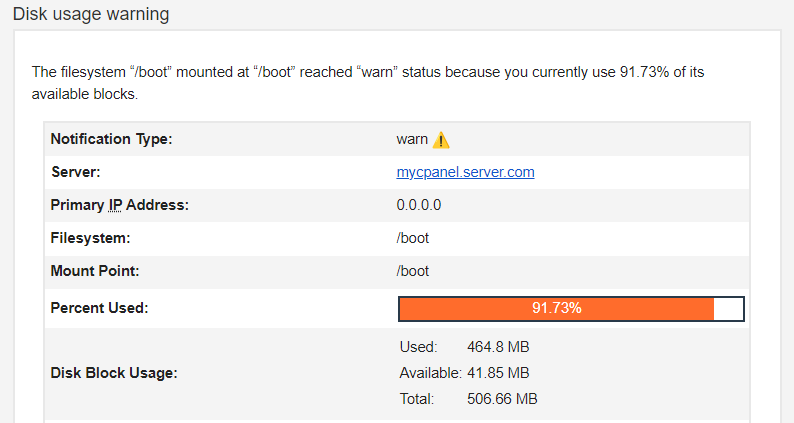
To resolve this issue we are going to run a few commands, Firstly we need to backup our server before modifying or removing any kernels, then we need to know what kernels are being used by our system to work out what kernels need to be removed.
Running this command will provide us with the kernel release version currently running on the system
uname -rThen run the following command to see what kernel versions are available to the system:
rpm -q kernelIn my example you are then able to see what kernel releases are not being used and you can remove them.
[root@myserver ~]# rpm -q kernel
kernel-4.18.0-513.24.1.el8_9.x86_64
kernel-4.18.0-553.5.1.el8_10.x86_64
kernel-4.18.0-553.8.1.el8_10.x86_64

[root@myserver ~]# uname -r
4.18.0-553.8.1.el8_10.x86_64
You can clearly see the 2 kernels that need removing; kernel-4.18.0-513.24.1.el8_9.x86_64, kernel-4.18.0-553.5.1.el8_10.x86_64.
I found a few ways to achieve this, but the most successful in removing the other files important files from /boot disk, this command will list the current packages that are install only:
sudo dnf repoquery --installonlyOnce you've listed packages marked as install only you run:
dnf remove $(dnf repoquery --installonly --latest-limit=-2 -q)This command removes older versions of install only packages cleaning up the boot partition.
Manually removing the kernel from your system
You can remove the kernels Manually by running this command:
rpm -e --nodeps kernel-4.18.0-553.5.1.el8_10.x86_64
rpm -e --nodeps kernel-4.18.0-513.24.1.el8_9.x86_64
In my example these were the version I removed, you would need to change the kernel version to match your scenario.
Other suggestions are too modify your /etc/yum.conf and change the following line installonly_limit the following:
installonly_limit=2You can repeat for DNF config /etc/dnf.conf but from my example this was already set.
Please advise with a system administrator or your technical support team with your hosting or cloud provider to get more advise on kernel removal as removing the wrong kernel can damage your system.